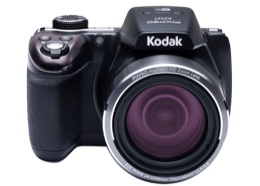
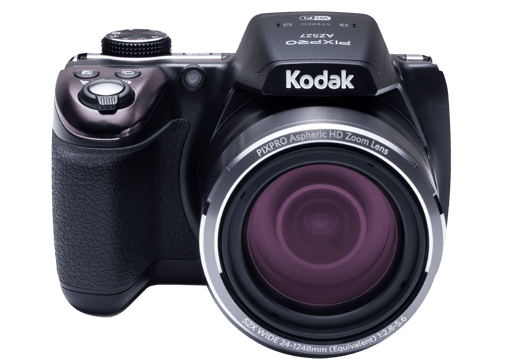
Kodak PIXPRO AZ527 product image
Verified model details are listed below. Product image is queued for review.

Camera Wiki

KodakPIXPROAZ527

  • Release yearSpec research queued
  • TypeKodak PIXPRO Astro Zoom bridge digital camera

Specs

Type
Kodak PIXPRO Astro Zoom bridge digital camera
Release year
Spec research queued
Megapixels
20.68 MP
Sensor
1/2.3"BSI CMOS
Lens
24mm (Wide) — 1248mm (Tele), F2.8 (Wide) ~ F5.6 (Tele), 52x
Memory card
SD/SDHC Card (Up to 32GB Support) [MMC Card Not Supported] Multi-Language Support 27 Languages Jacks AV-OUT/USB 2.0 (Micro 5 pin USB), HDMI (Type D) Eye-Fi Support Yes Wi-Fi Yes (802.11b/g/n) Remote Viewfinder Yes (via ios/Android device) Power Rechargeable Li-ion Battery LB-060, 3.7V 1100mAh, In-Camera Charging Shooting Capability (Battery Performance) Approx. 240 Shots (Based on CIPA Standards) Operation Environment Temperature: 0 ~ 40°C, Humidity: 0 ~ 90% Dimensions (W X H X D) Approx. 121.3 X 85.8 X 97.5mm (Based on CIPA Standards) Weight Approx. 508g (Body only) 116 Prompts and Warning Messages Message Description Action Warning! Battery exhausted. Warning before power off when the camera battery is exhausted. Charge the battery. Lens obstruction, Re-start Camera. The lens is jammed or some foreign object is preventing the lens from functioning properly. Turn off the camera and restart it to reset the lens. Suggest using tripod. The message will appear when shooting in low light/illuminated scenes. Use of a tripod or other support is suggested. Built-in memory error! An error occurs in built-in memory. Format the internal memory. Improper alignment. Please try again. The offset is too big for panorama shooting. Remove the message after 2 seconds and return to shooting. Warning! Do not turn off your camera during update! The message appears during the firmware update process. The message disappears after the camera update and restart. 117 Message Description Action Remove USB Cable! Indicates that you can disconnect the Micro USB cable. The message disappears after you disconnect the Micro USB cable. Connection Failed! Failure to connect to your PC, printer, TV (with HDMI). Remove the cable and retry connection. Write Protect ! The memory card is locked. Unlock the write-protect switch of the memory card. Card Full ! Indicates that the memory card is full. Insert a new memory card or delete unwanted images. Memory Full ! Indicates that the internal memory is full. Insert a new memory card or delete unwanted images. 118 Message Description Action Card Error ! The memory card can’t be identified after being formatted. Insert a new memory card or format the card with this camera. Card is not formatted. The inserted memory card is unformatted or has been formatted on a computer or other device and is not compatible with this camera. Disappear after 2 seconds and enter the formatting process. Slow access When a memory card lower than Class 4 is used to record a HD movie, the writing speed will be slower and recording will not continue. Use an memory card with Class 4 or higher. No Red-Eye Detected! Red eyes have not been detected in the image. The message will disappear after 2 seconds. This image cannot be edited. The file format does not support editing or the edited file cannot be edited again. The message will disappear after 2 seconds. 119 Message Description Action Exceeded maximum folder number. Prompt message when the archives or file folders in the memory card have reached the maximum (9999 for archives, 999 for file folder). Copy the images to your PC and format the memory card with this camera. Too many pictures for fast processing. During the playback by date, the images exceed specifications so that it is not possible to play by date. This may be solved by deleting unnecessary images. Unable to recognize files. The format of the file to be viewed is not supported or the file is corrupted so it cannot be properly read. You may be able to play it back on another brand of camera or on your computer. No Picture! When you press the play button, no image files exist in the camera or memory card. The message disappears 2 seconds later to return to the photo shooting screen. No continuous group file. When you switch from the playback mode to continuous photo mode, there is no continuous group file. The message disappears after 2 seconds and the camera returns to the normal playback mode. Protected! Undeletable! The file is protected. The message appears when you delete it. Unprotect the file before deleting. 120 Troubleshooting Problem Possible Causes Solution Camera does not turn on The battery has been depleted. The battery is not inserted correctly. Recharge the battery. Correctly reinstall the battery. Camera turns off suddenly during operation The batteries have been depleted. Recharge the battery. The picture is blurred Camera shakes while taking a picture. Turn on OIS feature. Please use tripod for high magnification (above 15X) optical zoom. Images and video files cannot be saved The memory card is full. The memory card is locked. Use another memory card or delete unnecessary files. Unlock the memory card. Images will not print from the connected printer The camera is not connected to the printer correctly. The printer is not PictBridge compatible. The printer is out of paper or ink. The printer paper is jammed. Check the connection between the camera and printer. Use a PictBridge compatible printer. Load paper into the printer or replace the ink cartridge in the printer. Remove the jammed paper. 121 Problem Possible Causes Solution Saving data to memory card is slow Using a memory card below Class 4 may result in slower recording times. Use an memory card with write Class higher than 4 to improve performance. Cannot write to the memory card The memory card has been locked. Release the write lock of the memory card or replace with another card. Too many movies to process The number of pictures or folders in the memory card exceed the specifications, so the playback of data folder cannot be displayed. Delete unwanted files. The flash icon appears on the LCD Current shooting environment requires flash. Turn on flash. When shooting with stacked filters attached, the corners of the photo may turn dark (Vignetting effect) because the filter holder blocks light from reaching the camera image sensor; especially, at wide angle zoom control settings. Please take test shots and review the results when using stacked filters. 122 Please enter the new password on smart device after changing Wi-Fi password. Some models of smart device will remember the Wi-Fi password previously entered, so please clear the old password on smart device manually before connection (For different models, this operation may be varied, please subject to your user manual.) 1 2 3 1 2 iOS system Android system © 2018 JK Imaging Ltd. All Rights Reserved. The Kodak trademark, logo and trade dress are used under license from Eastman Kodak Company. All other logos, products or company names that are referred to in this document are trade names, trademarks or registered trademarks of their holders. The holders are not affiliated with JK Imaging Ltd., our products or our website. JK Imaging Ltd., 17239 So. Main Street, Gardena, CA 90248 USA JK Imaging Europe, 71 Clarendon Road, Watford, WD17 1DS, UK kodakpixpro.com Made in Myanmar Ver. 4
Max memory
Up to 32GB Support
Battery
Rechargeable Li-ion Battery LB-060, 3.7V 1100mAh, In-Camera Charging
Size
Spec research queued

Sources