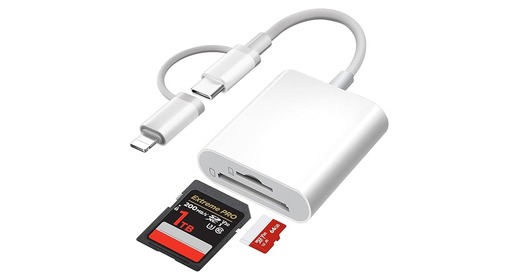
SD + microSD / TF reader
Choose USB-C or Lightning based on your phone. Many SD readers also include a microSD / TF slot, so one reader can cover both card sizes.
Old USB cables are easy to lose, slow, and often model-specific. A card reader works across cameras and lets the camera stay off while files transfer.
Most simple card readers are made for SD and microSD / TF. This is enough if your camera uses SD directly, or if your camera uses microSD / TF.
Choose USB-C or Lightning based on your phone. Many SD readers also include a microSD / TF slot, so one reader can cover both card sizes.
Universal readers are for mixed old-card setups. Always read the product listing before buying: the important part is the exact supported card list, not the word universal.
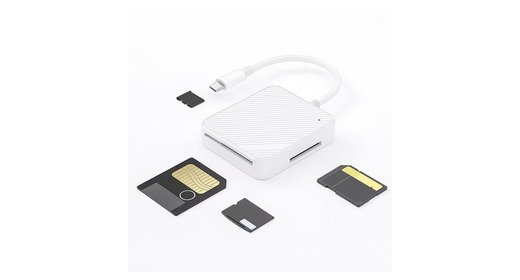
Use this when you need SmartMedia support. These readers often also support SD, microSD / TF, xD-Picture Card, Memory Stick, and other legacy cards, but confirm the supported formats before buying.
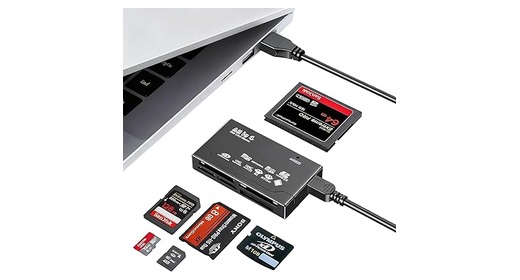
Use this when you need CompactFlash, xD-Picture Card, Memory Stick, or several card types at once. Check whether CF, xD, SM, SD, TF, and Memory Stick are included in the listing.
The card slot decides which memory cards the reader can read. The plug decides which phone or computer it can connect to.
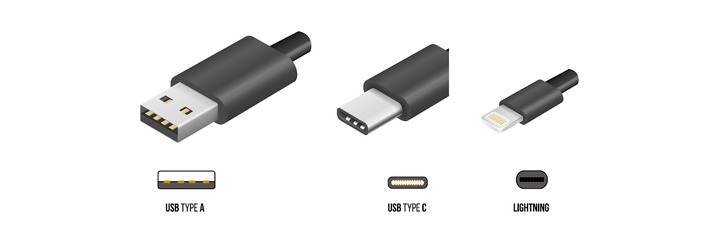
USB-A is the older rectangular plug for many Windows computers and older laptops. USB-C works with many newer phones, tablets, and newer computers. Lightning works with older iPhones and older iPads before USB-C.
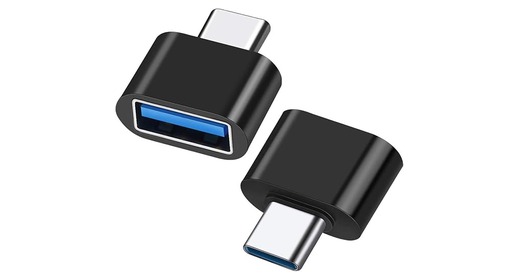
If the reader has the wrong plug, buy a small adapter instead of replacing the whole reader. Search for the exact conversion, such as USB-A to USB-C, USB-C to USB-A, or Lightning to USB.