What parents were actually asking
The question comes up again and again on parenting forums, and it is rarely about the camera. In a Mumsnet thread from January 2026, an 8-year-old kept asking for a phone, but what they really wanted was to listen to music and take pictures. Several parents gave the same answer: a small digital camera plus a separate music player, and no internet on either.
Other threads follow the pattern. A 10-year-old had outgrown a Kidizoom and an instant camera and wanted something more grown-up, but the parent didn't want to hand over a phone. Another 10-year-old with no phone wanted to learn photography and edit on the family Chromebook. On r/Cameras, a parent taking a 12- and a 15-year-old to Japan didn't want to buy the younger one a smartphone just for the trip.
What a camera replaces, and what it doesn't
- It replaces: taking photos and short videos, looking back through them, and having something of their own to carry on days out and trips.
- It adds: optical zoom. A phone's main camera crops in when you zoom; a travel compact moves real lenses, so a distant animal or a stage at a school show still looks sharp.
- It doesn't do: messages, apps, games, music, or instant sharing. The cameras below have no Wi-Fi or Bluetooth at all, so nothing goes online unless an adult moves it there.
That last point is the reason parents choose this route, but say it out loud to the child: the photos come home on a card, not straight to a group chat.
Four pocket cameras that fit an 8–12 year old
All four are compacts from 2008 to 2014 with optical zoom and SD card slots, and each has free sample photos on our site so you can judge the pictures before buying. Specs below come from the makers' published specifications and DPReview's spec pages.
| Camera | Year | Zoom | Screen | Battery | Wi-Fi | Real samples |
|---|---|---|---|---|---|---|
| Nikon Coolpix S3300 | 2012 | 6x (26–156 mm) | 2.7 in | EN-EL19, charged in the camera | No | See photos |
| Sony Cyber-shot W830 | 2014 | 8x (25–200 mm) | 2.7 in | NP-BN, charged in the camera | No | See photos |
| Panasonic Lumix TZ5 | 2008 | 10x (28–280 mm) | 3.0 in | Rechargeable Li-ion | No | See photos |
| Panasonic Lumix ZS20 (TZ30) | 2012 | 20x (24–480 mm) | 3.0 in touchscreen | DMW-BCG10 | No (has GPS) | See photos |
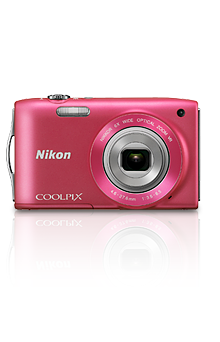
Nikon Coolpix S3300: the simple one
16 MP, a 6x zoom and Nikon's plain menus. It is slim enough for a coat pocket and records 720p video. The battery charges inside the camera with the supplied AC adapter, so there is no separate charger to lose; check that the listing includes the adapter or a compatible USB cable. We'd start an 8- or 9-year-old here.
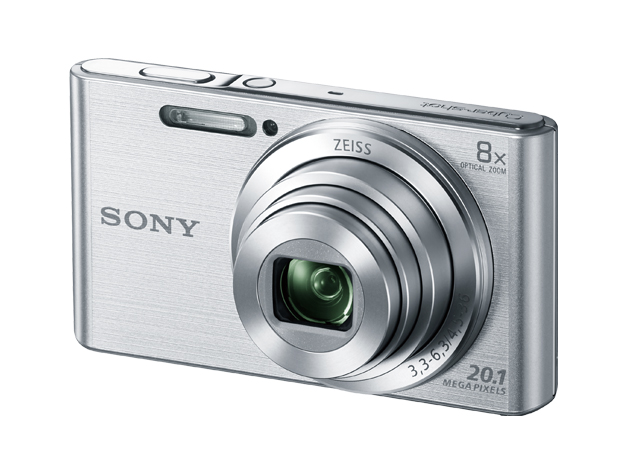
Sony Cyber-shot W830: more zoom in the same size
20 MP and an 8x zoom in a slim body, with 720p video. It takes SD cards (including microSD in an adapter) as well as Sony's Memory Stick, so an ordinary SD card works. Like the Nikon, it charges in the camera. A good fit for a 10- to 12-year-old who wants to zoom in on things.
Weighing it against Sony's older models? Our W830 vs S500 comparison puts the specs side by side.
Panasonic Lumix TZ5: the big screen and the long zoom
An older travel camera with a 10x Leica-branded zoom starting at a wide 28 mm, a 3-inch screen and 1280 × 720 HD video. It is chunkier than the Nikon and Sony, but the extra reach is what makes a child feel they have a "real" camera.
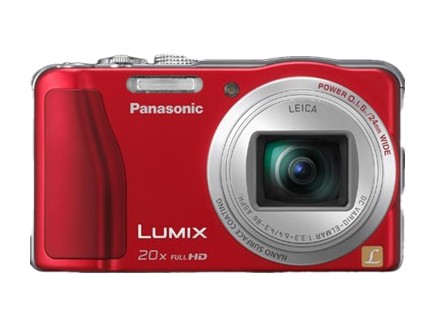
Panasonic Lumix ZS20 (TZ30): for the keen one, with one setting to change
A 20x zoom, 1080p video and a 3-inch touchscreen make this the most capable camera here, and a good one for a 12-year-old who is getting serious. It also has built-in GPS, which writes the location into every photo. For a child's camera, turn GPS off in the setup menu before handing it over, so photos shared later don't carry the home address.
Compare two side by side: open any two camera pages above, tap Shortlist on each, then open Shortlist from the menu. A free account compares two cameras at a time.
For a younger child, or one likely to drop the camera in a pool, start with the rugged models in our 4–8 year old guide instead. If losing chargers is the worry, the AA battery camera list has models that run on shop-bought batteries.
Getting the photos home
With no Wi-Fi, the card is the connection. That is simpler than it sounds:
- Card reader into a tablet, phone or computer. A USB-C or Lightning SD reader lets an iPad, iPhone or Android tablet import the photos directly, with no app or account. Chromebooks and most laptops read SD cards too. Our transfer guide walks through each one, and the card reader guide lists readers that work.
- A weekly "empty the card" habit. Copy the photos to a family folder, check them together, and leave the card ready for the next week. It is also a natural moment to talk about which photos are OK to share.
- A digital photo frame. One Mumsnet parent mentioned sending a child's photos to the grandparents' digital frame. Many frames take an SD card or accept uploads from an adult's phone.
Setting it up before you hand it over
- Set the date and time, so photos sort properly later.
- Use a small SD card, 8 GB to 32 GB. It holds thousands of photos and costs little if it goes missing. Our memory card guide explains what each camera accepts.
- Add a wrist strap and a soft case. The lenses on these cameras extend when switched on, and a drop with the lens out is the usual way they break.
- Buy a spare battery if you can, and check the seller includes the charger or adapter. If not, this guide shows how to find the right one.
What to budget for
Used prices for these models move with demand, so we don't quote figures here; check recent sold listings for the exact model. Add a card, a card reader, a strap and possibly a battery. A tested camera that includes its battery and charger is worth more than a cheaper body-only listing. Our where to buy and used camera checklist guides cover what to ask.
FAQ
What can I give my child instead of a smartphone for taking photos?
A used pocket digital camera with optical zoom, such as a Nikon Coolpix S3300, Sony W830 or Panasonic Lumix TZ5. It takes better zoomed photos than a phone and has no internet, apps or messaging.
Can a digital camera send photos to a phone?
The cameras in this guide have no Wi-Fi, so photos move by SD card. Plug a USB-C or Lightning card reader into the phone or tablet and import them, no app needed. Some later cameras have Wi-Fi, but for a child that is often a reason to avoid them.
Is an Instax a good alternative to a phone camera?
It is fun but different: every shot costs a sheet of film, and most models keep no digital copy. Hybrid models such as the Instax mini Evo and Liplay save digital files too. A digital camera is cheaper per photo for a child who shoots a lot.
What age is right for a child's own camera?
Many children manage a simple digital camera from around 5 or 6, especially a rugged one. From about 8, a regular pocket camera with zoom is a good fit, and by 12 many children can handle a more capable travel zoom.
Should a child's camera have GPS?
Not switched on. GPS writes the location into each photo, which can reveal where you live if photos are shared later. If the camera has it, like the Lumix ZS20, turn it off in the setup menu.
Next step: open the Coolpix S3300 and Lumix TZ5 sample photos with your child and let them pick the look they like. Then order a card reader at the same time as the camera, so the first photos can come home on day one.